Getting Started
Getting Started
This section helps you get started with Couper.
- Running Couper
Running Couper
Couper is available as docker image from Docker Hub
Running Couper requires a working Docker setup on your computer. Please visit the get started guide to get prepared.
To download/install Couper, open a terminal and execute:
$ docker pull coupergateway/couperCouper needs a configuration file to know what to do.
Create a directory with an empty
couper.hclfile.Copy/paste the following configuration to the file and save it.
server "hello" {
  endpoint "/**" {
    response {
      body = "Hello World!"
    }
  }
}
Now
cdinto the directory with the configuration file and start Couper in a docker container: - Examples
Examples
File and Web Serving
Couper contains a Web server for simple file serving and also takes care of the more complex web serving of SPA assets.
server "example" {

  files {
    document_root = "htdocs"
  }

  spa {
    bootstrap_file = "htdocs/index.html"
    paths = ["/**"]
  }
}
The
filesblock configures Couper’s file server. It needs to know which directory to serve (document_root).The
spablock is responsible for serving the bootstrap document for all paths that match the paths list. - Beta Features
About beta features
We use beta features to have the possibility to develop new, complex features for you while still being able to maintain our compatibility promise.
You can see beta features as a feature preview. We will announce new beta features in the Changelog.
We will keep features in beta as long as we collect feedback and are actively working on it. You can expect beta features to evolve.
They can change with every release.
- Introduction
Introduction
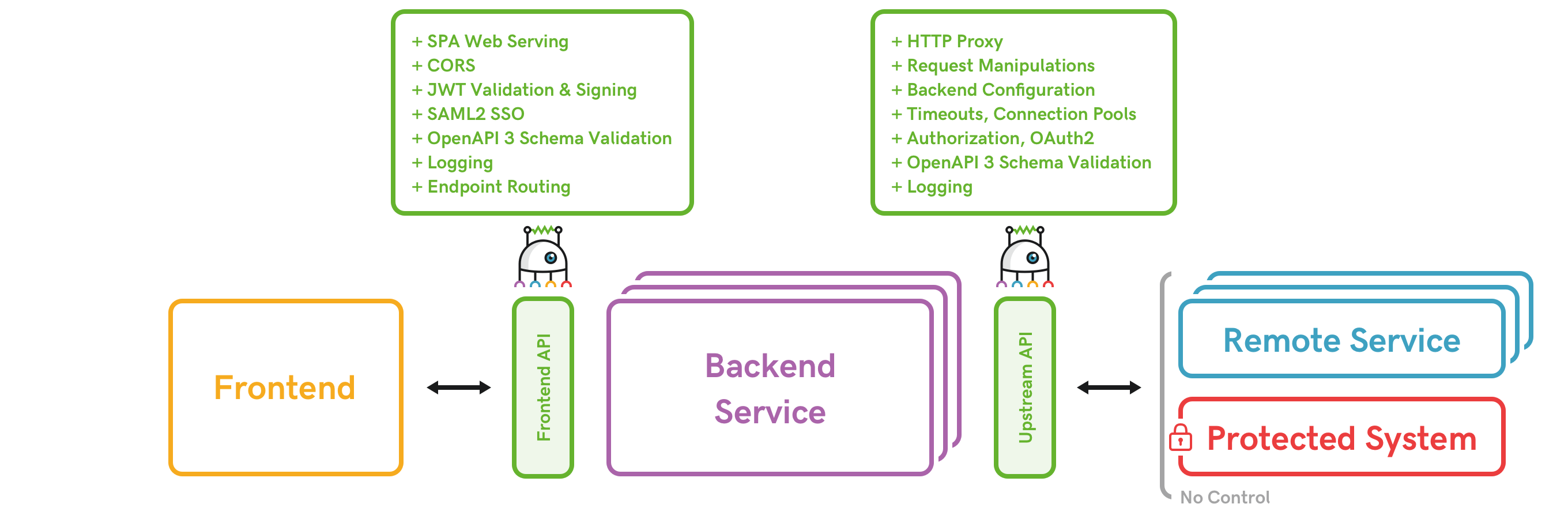
Couper is a lightweight open-source API gateway that acts as an entry point for clients to your application (frontend API gateway) and an exit point to upstream services (upstream API gateway).
It adds access control, observability, and back-end connectivity on a separate layer. This will keep your core application code more simple.
Couper does not need any special development skills and offers easy configuration and integration.
Architectural Overview